Class GameBoard
Tetravex Puzzle GameBoard
DO NOT USE SEARCH ENGINES, SUCH AS GOOGLE, OR GENERATIVE AI TO COMPLETE THIS ASSIGNMENT.
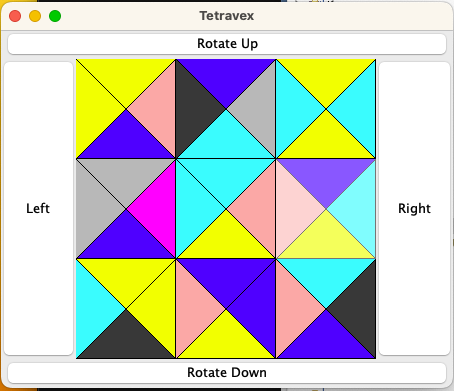
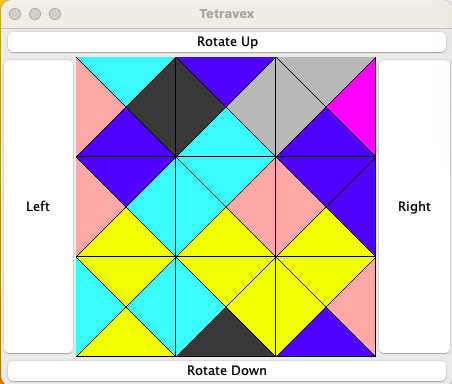
Tetravex is a tiling puzzle where the goal is to arrange the tiles so each tile matches the colors of all adjacent tiles along their common edges.
The tiles on the board are initially scrambled. The player can swap tiles to move them into position by clicking on a tile to select it, then clicking a second tile to swap the two. Additionally, the buttons around the outside allow the player to shift all the tiles in one direction with the leading tiles moving to the end.
Mixed up Tetravex puzzle.
Solved Tetravex puzzle.
Instructions:
Download the GamePiece.java and Tetravex.java into your project from Moodle.
Create a class called GameBoard.java.
Declare the board data field.
Create stubs for all of the methods. Include return statements with a value where necessary.
Write the constructor. Be sure to create GamePice objects in your array.
Write the getPiece method. At this point you should be able to run the Tetravex program and see the pieces show up on the board. Mouse clicks will select a piece, but none of the buttons will work.
Write the swapPieces method. At this point you can swap positions of the GamePiece's by clicking on one to select it, and clicking on a second to swap these two.
Write the generatePuzzle method. Run the Tetravex program and you should see a solved puzzle.
Write the isSolved method. Run the Tetravex program, when you click on a GamePiece the game will tell you that you solved it in 0 moves.
Write the jumblePuzzle method. To start with, limit the number of swaps you perform to make testing easier. You should be able to swap GamePieces and solve the puzzle.
Write the four rotate methods. These will make the buttons around the perimeter of the board work. Do one at a time and test them.
Submit GameBoard.java to Moodle.
-
Field Summary
Fields -
Constructor Summary
Constructors -
Method Summary
Modifier and TypeMethodDescriptionvoidSet the GamePieces in the board array so they are a solved puzzle.getPiece(int row, int col) Get a GamePiece object from the board at the given row and column.booleanisSolved()Determine if the puzzle has been solved.voidPerform random swaps of the GamePiece objects in board, to mix up the puzzle.voidShift the GamePieces in the board one space down.voidShift the GamePieces in the board one space to the left.voidShift the GamePieces in the board one space to the right.voidrotateUp()Shift the GamePieces in the board one space up.voidswapPieces(int r1, int c1, int r2, int c2) Swap two GamePiece objects on the board given by r1,c1 and r2, c2.
-
Field Details
-
board
board is a 2D array of GamePiece objects
-
-
Constructor Details
-
GameBoard
public GameBoard(int size) Construct a new GameBoard object. Build a 2D array of GamePieces for the instance variable board, then fill the array with GamePiece objects. The 2D array should be square with size rows and size columns.- Parameters:
size- The number of rows and columns in the array.
-
-
Method Details
-
getPiece
Get a GamePiece object from the board at the given row and column. If row or col is out of bounds, return null.- Parameters:
row- Row of the GamePIece to get.col- Column of the GamePiece to get.- Returns:
- The GamePiece at the given location on the board. null if the location is out of bounds.
-
swapPieces
public void swapPieces(int r1, int c1, int r2, int c2) Swap two GamePiece objects on the board given by r1,c1 and r2, c2. No bounds check is required.- Parameters:
r1- Row of GmaePiece 1c1- Column of GmaePiece 1r2- Row of GmaePiece 2c2- Column of GmaePiece 2
-
generatePuzzle
public void generatePuzzle()Set the GamePieces in the board array so they are a solved puzzle. Iterate through the array setting each GamePiece's north value to the south value of the piece above it (if there is one). Also, set the west component to the east component of the piece on its left (it there is one). -
jumblePuzzle
public void jumblePuzzle()Perform random swaps of the GamePiece objects in board, to mix up the puzzle. For testing, it may be wise to only perform a couple of swaps to make the puzzle easy to solve. For the final version, perform enough swaps to mix up the board. -
isSolved
public boolean isSolved()Determine if the puzzle has been solved. Check each GamePiece in board to make sure its north value matches with the south value of the GamePiece above it (if it exists) and the west value matches with the east value of the GamePiece on its left (if it exists).- Returns:
- true if the puzzle has been solved, false otherwise.
-
rotateLeft
public void rotateLeft()Shift the GamePieces in the board one space to the left. The GamePiece at the start of each row should move to the end of the row. Note: you do not rotate (spin) the individual GamePiece objects. -
rotateRight
public void rotateRight()Shift the GamePieces in the board one space to the right. The GamePiece at the end of each row should move to the start of the row. Note: you do not rotate (spin) the individual GamePiece objects. -
rotateUp
public void rotateUp()Shift the GamePieces in the board one space up. The GamePiece at the start of each column should move to the end of the column. Since board is an array of arrays, you can move entire rows all at once. Note: you do not rotate (spin) the individual GamePiece objects. -
rotateDown
public void rotateDown()Shift the GamePieces in the board one space down. The GamePiece at the end of each column should move to the start of the column. Since board is an array of arrays, you can move entire rows all at once. Note: you do not rotate (spin) the individual GamePiece objects.
-