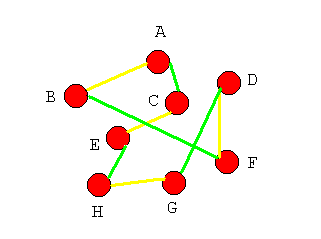
One useful way to store and display information is called a graph. They can be use to represent computer network connectivity, chemical bonds, distances between locations, and other relationships. A graph is a collection of vertices and edges connecting them.
|
Figure 1: an example of a graph with vertices A, B, C, D, E, F, G and H and two types of edges connecting them: yellow and green. |
A common visualization problem is graph layout: how do we arrange vertices in a way, most useful to the viewer? For instance the graph in Figure 1 can be rearranged as shown in Figure 2. Notice they are both the same graph with different layouts.
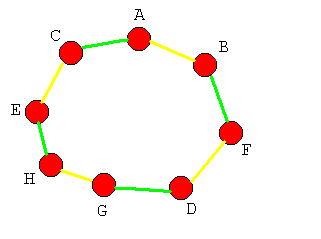 |
Figure 2: The graph from Figure 1 rearranged in a more useful manner. |
Create a visualization of the graph described below in 3 dimensions. Call it "graph.wrl".
Vertices: 16 vertices labeled A through P. There are two types of vertices. Those labelled with vowels (A,E,I,O) are one type, those with consonants are the other.
Edges: an edge between vertex A and B will be given below by (A, B). Notice there are four types of edges.
| Type | Edges |
|---|---|
| 1 | (A,B)(B,C)(A,C)(K,L)(M,N) |
| 2 | (D,E)(E,F)(F,G)(N,L) |
| 3 | (G,H)(H,I)(I,G)(K,P)(P,P) |
| 4 | (A,J)(J,B)(J,C)(D,J)(E,J)(J,F)(G,J)(J,H)(I,J) |
Pick some shape(s) to represent the vertices. Edges can either be represented by long objects translated and rotated into position, or IndexLineSet(s). How you choose to represent the types of both edges and vertices is up to you, but you need to make a clear distinction.
Hint: draw the graph on paper before you begin, so you can get a feel for the connectivity.
You should give the user multiple viewpoints from which to view the data. An "A" assignment will include labels. HINT: Consider using a PROTOtype for the nodes.
The user should be able to click on some object that will cause the scene to rotate . The simplest form could be rotation in one direction for 360 degrees (2*PI radians). The scene should return to its initial rotation at the end of the animation.
Add the object you want the user to click along with a TouchSensor. Route the TouchSensor's touch time to a TimeSensor which gets routed to an OrientationInterpolator, which rotates to the main Transform.
The user should be allowed to select (temporarily) one type of node or the other. If the user clicks on a consonant node, all consonant nodes should move in a small pattern around there current location. Do the same thing with vowels. The effect does not need to be turned on and off. In other words, click a node and a group will move for a bit and stop. You do not neet to move the edges with them.
You could build these intereactions based solely on the examples in class, however an "A" assignment will be more than just a rehashing of the interactions in class.
Submit your assignment by email.