Try playing the game breakout installed on our Linux machines to get an idea of basic gameplay. We will be building a three dimensional version of this game.
The goals of this assignment are:
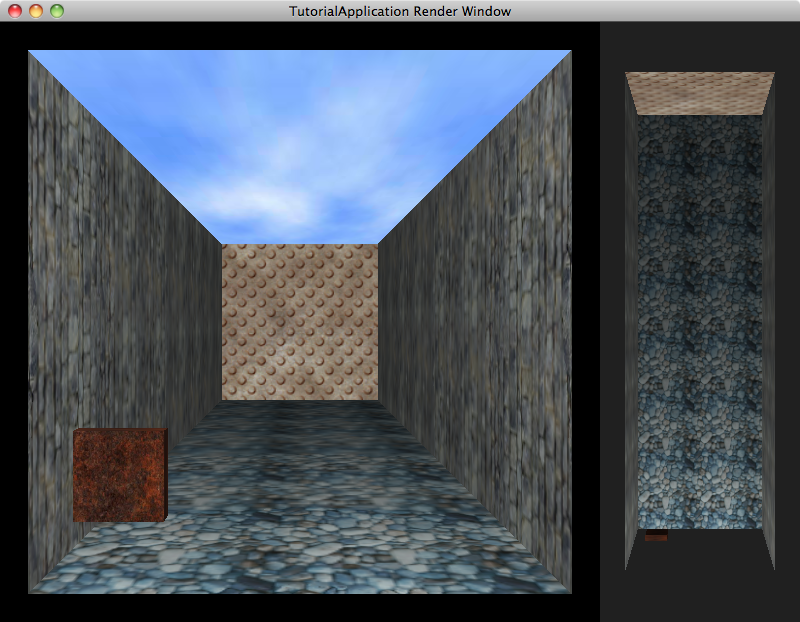
Implement the createScene method of your game. Create a court for your game with 5 walls. You will want to have the walls face inward since your camera view will be looking into the box created by them.
We used a plane to create the kind of surface you will need in our first Ogre project. You can find information about the classes and methods used at http://www.ogre3d.org/docs/api/html/.
You can start with the BasicTutorial05 code we've been working with. That will give you buffered input as well as overriding the code responsible for camera movement. You can find the original code at http://cs.gettysburg.edu/~cpresser/cs391/input/.
Experiment with materials. Ogre uses scripts loaded at runtime to describe materials. You can find these scripts within the media directory of the Ogre installation. On our Linux machines look in /usr/share/OGRE/media. The names of different materials can be found within the material scripts. Some materials are meant to be mapped onto complex objects (such as the robot) an look strange when stretched out across a plane.
Create a paddle using a cube mesh. Allow the user to move the cube around using the keyboard. Make sure the paddle stops at the edges of the court. You should encapsulate the code for a paddle object into a class and call methods of the class when the paddle needs to be moved or updated.
Create a ball that moves up and down the court. The ball should bounce off of the walls when it collides with them and should bounce off of the paddle. If it misses, the paddle reset the ball in the court.
Implement some way to launch the ball at the start of the game and when it gets reset.
Create obstacle objects in your court. When the ball runs into an obstacle it should bounce off and remove (or hide) the obstacle. You can simply implement them as cubes, or load other meshes. We will be doing simple collisions (boxes and spheres) complex models may behave strangly.
Keep score in your game. How a player accumulates (or loses) points is up to you.
Implement a way of losing the game. Limit the number of attempts a player has to play. There is nothing keeping you from implementing "1 up" bonues.
Build a simple user interface to control the game and display information for the user.
| Phase 1 and 2 | due in class Wednesday 2/23 |
| Phase 3 | due in class Monday 2/28 |
| Phase 4 | due Monday 3/7 in class |
| Phase 5 | due Friday 3/11 (before midnight) |
This project is worth 200 points broken up as follows:
| Category | Points | Description |
|---|---|---|
| Phases 1 and 2 milestone | 20 | A demonstration showing your court and operational paddle. |
| Phase 3 milestone | 15 | A demonstration showing your ball movement in the scene and its interaction with the paddle. |
| Phase 4 milestone | 15 | A demonstration showing your ball interacting with blocks/obstacles in the scene |
| Code Organization | 25 | Create appropriate classes and objects for your implementation. |
| Follows specifications | 75 | The game runs more or less as described. You may make modifications in the specifications in order to satisfy the functionality and creativity portion of the assignments. |
| Functionality | 25 | Include some additional features in your game: moving targets, "power ups" etc. |
| Creativity | 25 | Add your own style to the game. You might want to experiment with your own material scripts and textures. |