Early on in development, our main focus was testing the hardware's functionality and familiarizing ourselves with the python PiCar commands. These next three files demostrate our simple hardware tests of the camera, the color sense (for line following use later), and the wheels and steering.
Next, our focus was on the calibration step of the robot. This step is essential to the precise functionality of the robot. The biggest step here was centering the steering servo by zeroing the angle, and similarly centering the pan and tilt of the camera. The file below is focused entirely on this early step, no line-following yet.
After initial calibration, the majority of our work focused on improving the robot’s ability to reliably follow a line. Below are the most important improvements made throughout development.
Sensor & Calibration Fixes
Switched to per-sensor thresholds (loaded from sensor_thresholds.txt at startup) instead of a single shared value, since the three grayscale channels actually return different baselines on the same surface.
Corrected the sensor interpretation: on this robot, the grayscale sensors read higher on white floor and lower on the dark tape, not the other way around. A sensor counts as “on the line” when its reading is below its threshold.
Added steering trim calibration (loaded from steering_calibration.txt) so that “angle 0” actually drives Prince in a straight line. On our unit the measured trim was -6.
PID & Driving Improvements
Tuned the PID gains down from KP=28, KD=8 (which caused violent oscillation) to KP=20, KD=5. The integral term is left at zero, since straight-line tracking was already reliable without it and adding I introduced slow drift.
Dynamic speed control: cruising speed is 10, but Prince slows toward a floor of 6 on sharp errors so the controller has time to react before he overshoots.
Steering output is hard-capped at ±35° so a large transient error can't snap the wheels into a tight in-place pirouette.
Confidence-based slowdown: even when the instantaneous error is near zero, if the center sensor is only barely on the tape we lower the speed cap, since that's a strong signal Prince is about to lose the line entirely.
Recovery System
Introduced active recovery where Prince moves while searching for the line, instead of just stopping.
Added reverse-first recovery after observing that on this track, lost-line failures are almost always overshoots: the line is behind the car, not in front of it. Recovery reverses straight back (with two mild angled probes) before falling back to a forward sweep as a last resort.
Use a 20-cycle rolling window of recent error magnitudes to pick recovery mode, instead of just last_error. This prevents a single lucky “centered” reading right before line-loss from masking the fact that we were clearly approaching a corner.
Post-recovery directional turn: if the line was clearly biased to one side before being lost, after re-acquiring it Prince turns toward that side briefly to align with the new line direction instead of handing straight back to PID at a corner apex.
Saturation timeout: if one side sensor sees the line continuously for ~1.4s without the center ever coming back, that's no longer useful tracking. It means Prince is orbiting a sharp bend, and we force a recovery break-out.
Smoothness & Reliability
Added a short coast phase (up to 5 cycles, ~100 ms) before triggering recovery. The line often vanishes briefly as it crosses the gap between sensors and re-appears within a couple of cycles, so coasting at low speed with the last steering angle handles this without any jerky stop-and-search.
Hardened shutdown: a SIGALRM-guarded stop with three retry layers ensures Ctrl+C always returns the user to a shell prompt, even if the I2C bus has wedged.
Background music: a regal, royal-themed MP3 in the project root fades up while Prince is on the line and fades down when it's lost. The whole point was to make testing fun rather than tedious, and it absolutely worked. You can hear it on the music-and-crown clip. If the file is missing or pygame fails to load, the audio thread silently disables itself so line-following is never affected.
Final Line-Following + Calibration File
The file below represents the final version of our system, combining calibration,
PID control, recovery behavior, and all improvements listed above into one complete script.
Prince has three small grayscale sensors pointing down at the floor: left, center, and right.
A dark line on a light floor reads as a low number; bare floor reads high. From those three numbers
the robot computes a single error: roughly “how far off the line am I, and in
which direction?” Negative means the line is to the left, positive means it's to the right,
zero means dead center.
That error feeds a PID controller, which turns it into a steering angle. The
proportional term (P) reacts to how far off the line we are right now, and the derivative term (D)
damps out the wobble that pure P-control creates. The integral term (I) is left at zero on this
robot because straight-line tracking is already good enough without it, and adding I tended to
cause slow oscillation. We also slow Prince down on sharp turns so the controller has time to
react before he overshoots.
The trickier part is what happens when Prince loses the line entirely, for example on a
90° corner that's sharper than his turning radius. The system handles this with a small
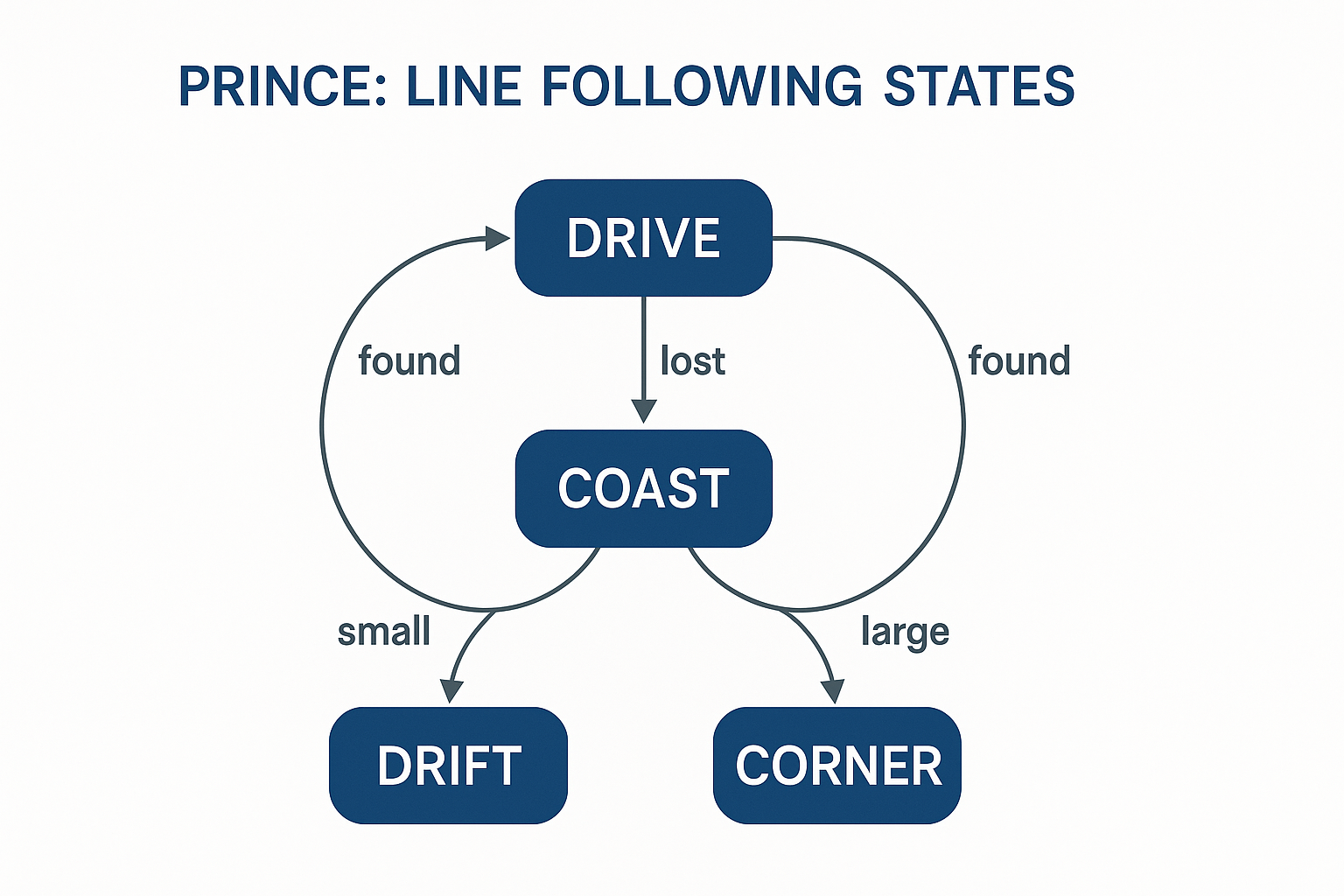
state machine:
The four states Prince moves between while following a line.
DRIVE (PID). The normal cruising state. Sensors see the line, PID computes a steering angle, Prince drives forward.
COAST. The moment all three sensors stop seeing the line, we don't panic. We keep driving with the last steering angle for a handful of cycles (about 100 ms). Most line losses on curves resolve themselves here without ever triggering a real recovery.
DRIFT RECOVERY. If the coast phase doesn't get the line back and the error just before losing it was small, we assume Prince drifted slightly off a mostly-straight section. He reverses gently and sweeps the steering through small angles to find the line again.
CORNER RECOVERY. If the error was large just before losing it, Prince almost certainly overshot a sharp corner. He reverses harder and sweeps through wide angles to re-acquire the line.
The reason recovery is split into two modes is purely practical: on straights we don't want
Prince to throw himself backwards every time he wobbles off the tape, but on corners a gentle
little sweep won't find a line that's now 35° off to the side. The error magnitude at the
moment of line loss is a surprisingly reliable signal for which situation we're in.
Further Reading
We didn't arrive at any of this from first principles. When we first hit the runaway-oscillation
problem on simple proportional-only steering, we asked Claude Code for help debugging and the
suggestion was “you probably want a PID controller, here's the gist.” That kicked
off a lot of reading.
Honestly, the best resource is Prof. Neller himself. He has a great set of
readings on PID and control systems, and a quick conversation in office hours will get you
further than most blog posts. Ask him before you spend a weekend tuning gains by trial and
error. If you're getting started on your own, the resources below are also good:
“PID Without a PhD” by Tim Wescott – the classic plain-English intro to PID for embedded engineers. Search the title; it's been mirrored everywhere.
Brett Beauregard's “Improving the Beginner's PID” blog series – a hands-on walkthrough of why naive PID implementations misbehave, written around the Arduino PID library.
For any future teams working with this robot, we highly reccommend testing the functionality of the hardware before you begin. We encountered some serious roadblocks with connecting to the robot, as well as with the hardware. Our robot tended to drift while intending to drive straight, an error we had to address before we could begin any line-following.