Create an Overleaf account.
The basic document.
Using Overleaf create a new project called assessment. enter the basic LaTeX document information (shown below). . Do the following in the document:
- Change the author and title of the document.
- Write a paragraph describing your mathematical strengths and weaknesses.
- Write a second paragraph assessing your ability to write mathematical proofs. What types of proofs are you best at? What aspects give you difficulty?
- Add a comment at the top indicating the date on which you did this assignment. This will not appear in the pdf version of the document.
The basic document:
\documentclass[letterpaper, 11pt]{article}
\usepackage{fullpage}

\title{Simple Document}
\author{Your Name}
\date{\today}

\begin{document}
\maketitle

%add content here
\end{document}
In Overleaf's "Menu", click the "Source" icon in the "Download" section to download a zip containing the project's tex file. Click the pdf icon to download the pdf file. Submit them as assessment.zip and assessment.pdf.
Mathematical formulae
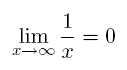
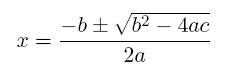
Create a New Project called formula that contains the following items. You only need to reproduce the text in the boxes, not the boxes themselves or the bullet list describing them.
The sum
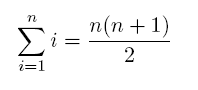 .
.The sum above appearing in the middle of a sentence. It should look like
 .
.The limit
The quadratic formula:
As in the previous part, download the zip and pdf and submit them as formula.zip and formula.pdf.
Review/Chapter 1 Problems
Use Overleaf to complete the worksheet which I shared: https://www.overleaf.com/read/nhrrdvbrdcbn.
In Overleaf's "Menu" select "Copy Project" to make your own copy of the review sheet.
Submit review.zip amd review.pdf.